In this tutorial we are going to give a Rasberry Pi rights to Synology folders. Can access the folders of your Synology.
First, it’s important. That your Rasberry Pi has a fixed IP address. Because if your network goes down. Or your Rasberry Pi will reboot. Then there is a chance. That your Pi gets a different IP address. We are going. Give permissions to the IP address of your Rasberry Pi.
Open your Synology’s web page.
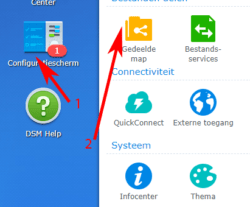
Go to Control Panel.
Click Shared Folder.
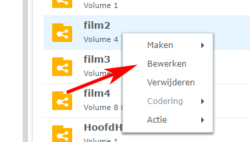
Right-click on the folder you want to access with your Rasberry Pi.
Choose Edit.
Go to NFS Permissions.
Click Create.
At Hostname or IP:. Enter the IP address of your Rasberry Pi.
You are now done with the tutorial How to give Rasberry Pi permissions to Synology folders.
It may happen that a Usenet download does not come in completely. You try to…
House-of-Usenet.com is a popular German-language Usenet forum where members can find NZB files for downloading…
Usenet-4all.pw is a predominantly German-language Usenet forum focused on sharing and finding NZB files. Using…
Sky-of-Use is a German-language Usenet forum where users can find NZB files to download content…
PublicDomainTorrents is a website entirely dedicated to films in the public domain. This means that…
In this Anonynews Usenet review, we look at the key features, performance, and costs of…
Deze website gebruikt cookies.