In the tutorial configure Medusa Windows. We are going to configure Medusa program. To automatically download TV series from Usenet. Also known as the newsgroups. It is important that the NZBGet all ready is installed. And you must be able to download from the newsgroups. If that is not yet the case. then follow first NZBGet tutorial.
Configure Medusa Windows folders.
Create a folder in a location where you have a lot of space. to save your TV series.
Open Windows Explorer. Choose the location where you want to create the folder. Right-clickin Windows Explorer. And choose Newand then Folder.
Right-clickon the TVmap. Then choose properties.
Go to the Sharetab. Click Share. Select Everyone.And click Add.
Now everyone in your home network can access your series.
Start your internet browser. And open Medusa. Default is this http://127.0.0.1:8897.
Click on the gear icon at the top right. And then go to General.
Click New. And add all TV series folders you have created.
And then Save Changes.
If you are using Set as Default. Then by default, every series is added here. You can still adjust this separately for each series.
Go to Search settings.
Adjust the Usenet retention. To the retention of your Usenet provider. You can often find this information on the website of your usenet provider. This is often set too low.
Check the boxes below.
Use Failed Downloads
Delete Failed
This ensures that if a download fails. That a new nzb file is being searched. On the Newznab providers.
Delete failed takes care of it. That the failed download will be deleted.
here you can delete your foreignlanguage Otherwise, foreign series may not be downloaded.
If your media player can’t handle something. Like x265 enter this at Undesired words.
With Preferred words you enter x264 or x265. Because the advantage of X265 is that it takes up less space on your hard disk. But the quality of the tv show. Is just as good.
And click onSave Changes.
Go to NZB search.
Fill in the above information. This is probably a little bit different.
The default password of nzbget is nzbget.
Go to Search providers.
And then select Configure costum newznab providers. Most built-in providers are only for torrent files. I recommend that you do not use Binsearch. Because you will receive a lot of wrong downloads.
See the Newznab providers for a list.
And click onSave Changes.
Go to Subtitles Search settings.
Add English and more if you want those.
Go to the Subtitles pluginstab.
Select, in any case, the above services
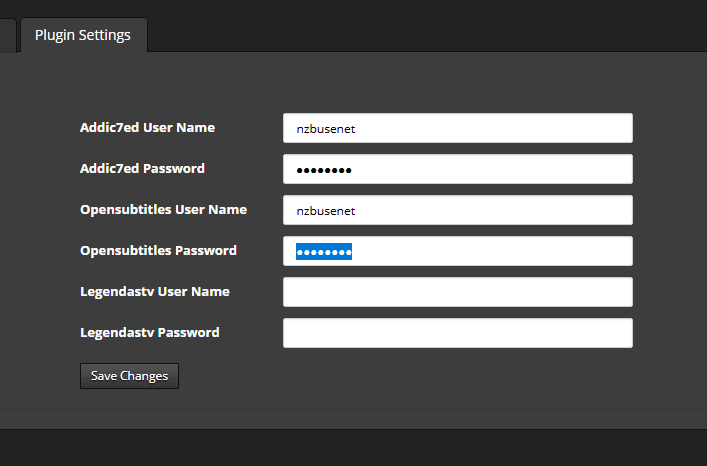
Go to the Plugins settings tab. And enter the login details here.
If you don’t have accounts for this yet, see:
https://www.opensubtitles.org/en/newuser
https://www.addic7ed.com/login.php
Go to post processing.
Take over the above.
Open Epsisode naming.
Take over the above.
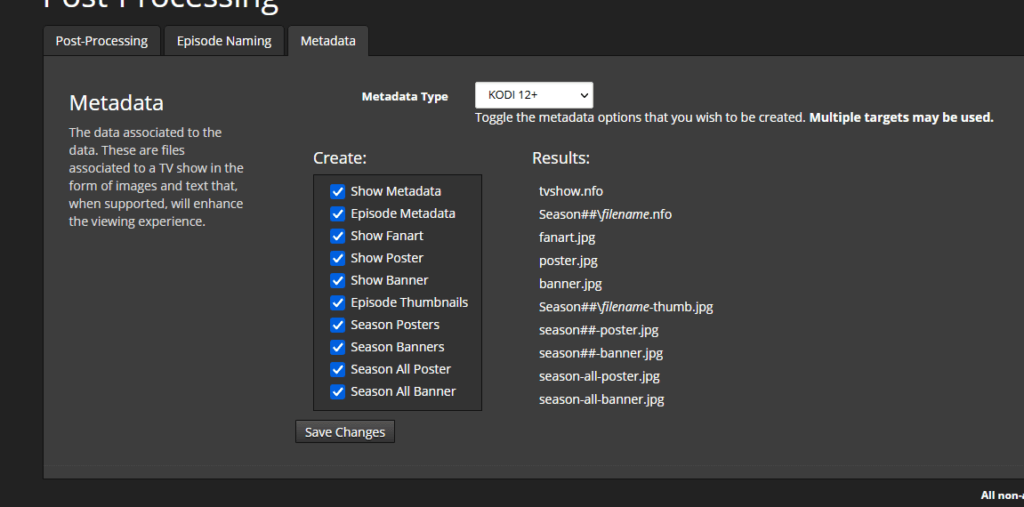
Open Metadata.
If you want covers and stuff to be downloaded for example Kodi.
Then copy the above.
If you want Kodi to be updated. Take over your above. And enter the ip address of your Kodi device.
Click Showat the top. And then Add shows.
Then click on Add New Show.
Search for your desired TV series. And click on search. And select it.
Click Next.
Select Costumand use the CTRL key to select multiple.
Medusa is now looking for new TV series. To download from the newsgroups. This may take some time to download everything. It depends on how many api requests you have from your newznab providers. The more you add, the greater the chance that everything will be downloaded. I also recommend taking at least one good paid one.
This was the tutorial Configure Medusa Windows. If you have any questions, see the Medusa FAQ. Or leave a message.
Tutorial Windows Medusa
It may happen that a Usenet download does not come in completely. You try to…
House-of-Usenet.com is a popular German-language Usenet forum where members can find NZB files for downloading…
Usenet-4all.pw is a predominantly German-language Usenet forum focused on sharing and finding NZB files. Using…
Sky-of-Use is a German-language Usenet forum where users can find NZB files to download content…
PublicDomainTorrents is a website entirely dedicated to films in the public domain. This means that…
In this Anonynews Usenet review, we look at the key features, performance, and costs of…
Deze website gebruikt cookies.