In this SpotWeb Windows installation tutorial. We’re going to be the first to install Xampp. And then install SpotWeb. Xampp is a useful program. To quickly and easily install a Web server. Xampp can also be used if you want to test or create websites.
Download Xampp from the next location.
Start the xampp-win32-7.2.3-0-VC15-installer.
You can get the above notification. Then click OK.
Press on Next.
Check only the above. That’s all you need for SpotWeb.
Turn off the Learn more about Bitnami check mark here.
And click Next.
Now Next.
And wait a little.
You will most likely see the screen above during installation.
Put the check mark to Private networks such as home or corporate networks. And turn off the other check mark.
Click Finishnow.
The installation of XAMP is ready. Xamp is now starting.
Click Save.
You will see the screen above now.
Start Apache and MYSQLnow.
Click Private networks such as home or corporate networks.
And turn off the other check mark.
Then click Allow Access.
Now we can start installing SpotWeb.
If everything went well. Now you have two greens. Apache and MYSQL in XAMPP.
Click Explorer. And open the folder htdocs. Create spot web here in a new folder.
Unpack the downloaded zip file. With, for example, the Winrar program. Or with Windows.
Now post the contents of the unpacked zip file. In the spot webfolder. See the image above.
Now open the next page http://127.0.0.1/phpmyadmin/ in your browser.
Click new. And then enter the name spot web. Press on Create.
You now have a database on the left at spotweb.
Now open http://localhost/spotweb/install.php in your browser.
Now go through the wizard.
Of course, it’s very nice when Xampp and SpotWeb start automatically. While starting Windows. We’re going to take care of this now.
Open Xampp. And click Config.
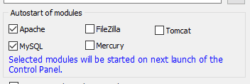
Turn on the following two check marks here. Apache and MySQL.
Mysql and Apache are now started automatically. While starting Windows. SpotWeb can therefore be approached.
You’re all set now. By installing SpotWeb on Windows.
SpotWeb Windows installation tutorial
It may happen that a Usenet download does not come in completely. You try to…
House-of-Usenet.com is a popular German-language Usenet forum where members can find NZB files for downloading…
Usenet-4all.pw is a predominantly German-language Usenet forum focused on sharing and finding NZB files. Using…
Sky-of-Use is a German-language Usenet forum where users can find NZB files to download content…
PublicDomainTorrents is a website entirely dedicated to films in the public domain. This means that…
In this Anonynews Usenet review, we look at the key features, performance, and costs of…
Deze website gebruikt cookies.