In this tutorial we will set up Sonarr v4 on a Synology system.
Sonarr is een handige tool waarmee je automatisch tv-series kunt downloaden vanuit nieuwsgroepen of via torrent-bestanden. In deze handleiding bespreken we de nieuwsgroepen optie met SABnzbd.
Go to Settings. And then choose Media Management.
Turn on Show Advanced Settings.
Check Rename Episode
You might wonder why rename? Well that’s very simple. quite what releases are encrypted. Which gives you strange filenames. Such as “02ffbc012101519975abb1a24015ef13.x264”. It then becomes a huge mess. The result of this is that other programs cannot handle this well, such as Kodi or programs to download subtitles for your series.
Therefore, you should use the following settings.
Standard Episode Format “{Series.Title}.S{season:00}E{episode:00}.{Episode.Title}.{Quality.Full}-{Release.Group}”
Daily Episode Format “{Series Title} – {Air-Date} – {Episode Title} {Quality Full}”
Series Folder Format “{Series Title}”
Season Folder Format “{Series Title}”
Create empty series folders Yes
Download Propers Yes
Analyse video files Yes
Now go to the Tablad profiles.
Click a section that you want to start using. And adjust this to your own preference. Above is my preference.
It’s best to leave the language setting set to English unless the TV series is also available in your own laungage However, the chance of finding a Dutch series is very small. This is because such series are rarely uploaded to newsgroups. And even if they are, the scene rules are often not followed, so they are still not downloaded by Sonarr.
Door met je muis over de drie streepjes te gaan en dan sleep en pleuren, kun je de volgorde aanpassen waarin Sonarr probeert te downloaden.
At Cutoff you indicate when Sonarr has to stop searching.
When you’re done, click on Save Changes
If you go down a little you will see Release profiles. Click on the plus sign below, and in the Must not contain field, add something that you do not want to be downloaded. I don’t like MeGusta’s spots because they often only have 2.0 sound and I want at least 5.1 sound with my series. That’s why I’m blocking this release.
Set up Sonarr V4 Synology Quality. So you get fewer wrong downloads.
Now we go to the Tablad Quality. By default, the Minuim Quality is 0. It is best to adjust it. So that it can be filtered. Beware! If you watch animated series, set this option not too low. Because these kinds of TV series are usually much smaller.
Beware! As you can see, you also have to change the Title here to keep them close to the scene name. Of the dashes make a point and 1080p and 720p must be at the front. So as an example “HDTV.2160p”.
Now we go to the tab indexers. These are sites whose NZB files are downloaded automatically. The more you add, the more likely your TV series will be downloaded.
See also Newznab sites for an overview. Create an account with some of these Newznab providers.
If you did. Click on the plus.
Then, at Neznab, click Costume.
You’ll see the above. Enter the details of the Newznab site.
The API key can almost always be found in your account settings on the NewzNab site. If you have done that, first do a Test and then Save . Now add all your Newznab sites in this way.
It is best to leave some sites if you also have other programs such as CouchPotato for example. So you your API hits are divided. If you do have an account with a paid Newznab site, then it often doesn’t matter. Then you usually have enough API requests.
Once you have added all your Newznab sites. You also need too activate the below Newznab provider.
You do this in the same way. You do not need an account.
URL http://lolo.sickbeard.com
Categories 5030.5040
Below you see Options.
Minimum Age on 60.
Retention Here you enter the retention of your Usenet provider. This ensures that no API requests are wasted, which your Usenet provider cannot download anyway.
RSS Sync Interval Set it to 20 or more. But not too much else it can already be gone thanks to DMCA. But certainly no less otherwise, your API requests are also very fast gone.
You need the API key from SABNZBD.
Open a second tab in your browser, and open SABnzbd (default 127.0.0.1:8080)
Go to Settings.
Click General and copy the API key.
Now get back to Sonarr.
Click Settings.
Go to the client download tab.
Click on the plus.
Fill in the above information.
Name No matter what.
Host localhost or 127.0.0.1
API Key (API key in SABNZBD) comes from SABNZBD that you just copied you.
Username Please enter your own user name of SABNZBD
Password Please enter your own password from SABNZBD.
Category TV This should be really TV, otherwise it doesn’t work well.
Recent Priority should be lower than Older priority. Because it is often trickier to download old TV episodes than TV episodes that are just out.
Now click Test. If the test has gone well click Save. If it is not good. Then you do have entered a wrong user name, password or API key.
If you have a media player like I do. Then you must specify the data. So that your library is updated with the latest TV series. If you don’t, you can skip these next two steps.
Go to the Tablad Connect.
Click on the plus.
These are my settings, but they are usually different for everyone.
Click on Test. And then on Save.
This option is only used if you have a media player. Otherwise you can skip this too. These are my settings for Kodi. This will ensure that covers are downloaded for Kodi.
You can skip this step. If you don’t have a TV series on your Synology Nas at all.
If you already have some TV shows. You can add it in Sonarr.
Go to Series. And then Library Import.
Press on Choose another folder.
Click on the Blue folder , and select the folder where your existing tv shows are. And then click OK.
First we will have to create the folders on your Synology where the TV series will be stored.
I use DSMm7 myself, if you use DSM6 it may be a little different. But the basics are the same.
Open a second Tab in your browser. And go to the web page of your nas http://your-ip-address-nas:500
Go to FileStation, and choose Create. And then Create New Shared Folder.
Give the folder a name and press Next. And then three more times on Next.
Select System Internal Users.
And give sc-sabnzbd and sc-sonarr Read and Write permissions. Otherwise the download will fail.
If you have a media player, these are often Linux devices. You must also give these permissions to access the series folder, otherwise you cannot play it.
Right-click on the folder you just created. And choose properties.
Go to NFS permissions.
And enter the IP address of your media player here. It is wise to give this media player a fixed IP address. Because if it gets a new IP address, these rights will no longer work.
Unfortunately I can’t tell you how to do that because it differs per modem/router you use.
I use a Unifi system and I need to check Fixed IP address. When opening my Kodi box in my Unifi dream machine.
Now it’s time to add TV shows in Sonarr. Now go back to Sonarr V4.
Go to main screen.
Enter the name of your tv show here.
Press on Add New Series.
Select the tv show you want to add.
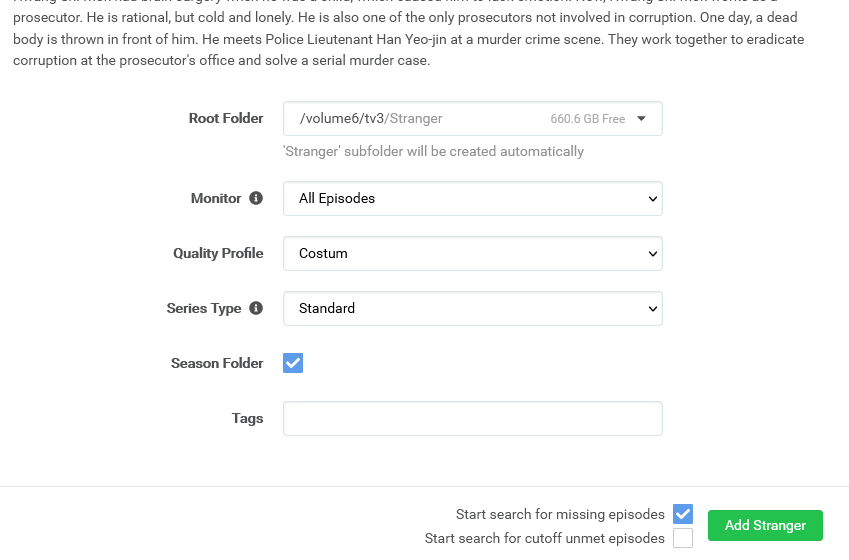
You will then get the above screen.
Root folder is the folder where your series are stored.
Check the Start Search for missing episodes.
Sonarr will now search for your series via the Newznab sites you specified, and then SABnzbd will download your TV series. And Sonarr moves the files. In the correct folder.
This was the tutorial setting up Sonarr v4 Synology.
Sonarr v4 Synology tutorial
It may happen that a Usenet download does not come in completely. You try to…
House-of-Usenet.com is a popular German-language Usenet forum where members can find NZB files for downloading…
Usenet-4all.pw is a predominantly German-language Usenet forum focused on sharing and finding NZB files. Using…
Sky-of-Use is a German-language Usenet forum where users can find NZB files to download content…
PublicDomainTorrents is a website entirely dedicated to films in the public domain. This means that…
In this Anonynews Usenet review, we look at the key features, performance, and costs of…
Deze website gebruikt cookies.