

Very occasionally, it’s necessary to check files with Quicksfv. This happens when there are no PAR files present, but there is an SFV file. The biggest disadvantage of an SFV file is that you can’t repair files with it. It can only be used to verify whether the files arrived safely on your computer.
Download Quicksfv
http://www.quicksfv.org/download.html
Note: Download the current version. There’s a 32-bit and a 64-bit version available. Not sure if your Windows version is 32-bit or 64-bit? Choose 32-bit, and you’ll be sure to get the job done.
Installing and using Quicksfv
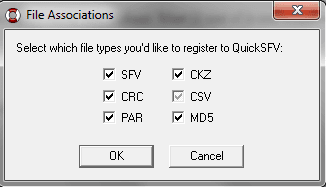
Run the EXE setup file and click OK. Click OK again, and you’ll see the screen above.
Uncheck the PAR files checkbox. And click OK. Because for PAR files, it’s more convenient to use Quickpar. Now click “OK” one more time, and you’re done installing QuicksSFV.

Now all SFV files will look like this in Windows Explorer.

As you can see, my download didn’t go well. This is because I’m missing all the RAR files. But if it does work, there are green checkmarks.
You’re now ready to check your downloaded files with Quicksfv. And you’ll know if your download went well.


Be the first to comment