

What is a Usenet block account? Learn how download credit works, when it’s a cost-effective choice, and how to set it up as a backup in SABnzbd.
A Usenet block account is an account with which you purchase a certain amount of download credit in advance. For example, you pay for 100 GB or 1 TB and use that credit when you download files from the newsgroups. Instead of paying for a month of access, you pay for an amount of data traffic.
This can be useful if you only download occasionally. However, even if you already have an unlimited Usenet subscription, a block account can be a helpful addition; you can set it up as a backup for content that your primary news server is unable to provide.
In this article, you will learn how a Usenet block account works, when it might be a good option for you, and what you should look out for before purchasing one.
What is a Usenet block account?
A block account can be compared to prepaid credit for your phone. You purchase a data bundle from a Usenet provider, after which you receive access to a news server, along with the corresponding login credentials.
If you download via that server, the usage will be deducted from your balance. As long as you have sufficient credit and your account remains valid, you can continue to use it.
A simple calculation example: you purchase 500 GB, and the provider subsequently records 20 GB of usage. You are then left with approximately 480 GB. The recorded data usage does not necessarily have to be exactly equal to the size of the final, unpacked file. Downloaded archives and repair files also play a role; these repair files are only downloaded if they are needed.
What is the difference compared to a Usenet subscription?
With a standard subscription, you generally pay for access over a specific period—for example, a month or a year. The amount you are permitted to download depends on the plan: there are unlimited subscriptions as well as plans with a data limit.
With a block account, the focus is specifically on the volume of data traffic.
Always check the terms and conditions. A monthly data allowance that expires or resets periodically works differently than a prepaid block account.
How long does a Usenet block account remain valid?
Some providers offer block accounts with no expiration date. In such cases, your credit remains available until you have used it up. XS News, for example, explicitly states this regarding its block accounts.
Do not automatically assume that every provider has the same terms and conditions. Before placing an order, check:
- Whether the credit has an expiry date.
- Whether any conditions apply in the event of prolonged inactivity.
- Whether new credit is added to your existing balance.
- Whether automatic top-up is possible and enabled.
Moreover, the absence of an expiration date does not mean that the service is guaranteed forever. Its availability remains dependent on the Usenet provider.
Moreover, the absence of an expiration date does not mean that the service is guaranteed forever. Its availability remains dependent on the Usenet provider.
If you download infrequently or irregularly
Do you only use Usenet occasionally? If so, a recurring subscription might mean you end up paying for months in which you don’t download anything at all.
A Usenet block account with no expiration date can be more cost-effective. You only use up your credit when you actually download something via that server.
Be sure to compare costs based on your own usage. If you regularly download large amounts of data, a subscription might work out cheaper for you.
As a backup alongside your primary provider
Another application is using a Usenet block account as a backup server. In this setup, you use your regular subscription for the majority of your downloads. Only when that server is missing certain parts will your download software attempt to retrieve them from the backup server.
Een download uit Usenet bestaat uit veel afzonderlijke artikelen. Het kan voorkomen dat een deel bij je hoofdprovider ontbreekt, terwijl een andere server het nog wel heeft. Een aanvullende server kan dan helpen om de download compleet te maken.
This only works if the missing items are actually available on the second server.
To try out another provider
A small data bundle can also be a way to test a different provider—for example, to see if they can supply those missing items.
When doing so, don’t just check the download speed. Most importantly, look at how much the additional server contributes to your existing setup. A second Usenet provider that adds hardly anything offers little value as a backup.
Preferably choose a different Usenet network
Two different brand names do not automatically mean that you get access to two different Usenet networks.
Some providers sell access to the same underlying infrastructure—often referred to as a “backbone.” If both accounts rely on largely the same storage, the likelihood of overlap is very high.
For a backup, a provider with a different underlying network is often a better choice. The SABnzbd documentation also suggests using an additional news server on a different backbone as a potential solution for missing articles.
Check the current network details before making a purchase. Providers may change their infrastructure. Furthermore, switching to a different backbone is no guarantee; items may still be missing or have been removed there as well.
Setting up a Usenet block account as a backup
Below, I describe how to set up a backup provider in various Usenet programs. Not every program offers this feature; in many older programs—such as GrabIt—it is not possible.
Setting up a backup provider in Sabnzbd
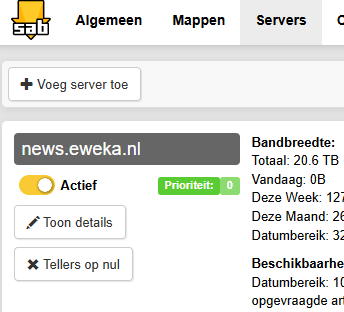
In SABnzbd, you can add multiple news servers and assign a priority to each one. A lower number indicates a higher priority; for instance, 0 is used before 1.
For a simple combination, use:
| NewsServer | Priority |
|---|---|
| Major provider with an unlimited subscription | 0 |
| Usenet Block account as backup | 1 |
SABnzbd first attempts to find the articles on the server with priority 0. If the articles are not available there, the program tries the next priority group.
Here’s how to set this up:
- Open SABnzbd en ga naar de instellingen.
- Open the Servers section.
- Controleer of je hoofdserver prioriteit 0 heeft.
- Add the news server for your block account.
- Enter the server address, your username, and your password.
- Use the SSL/TLS settings and port specified by your provider.
- Geef de back-upserver prioriteit 1.
- Test the connection and save the settings.
If you assign the same priority to both servers, they can both be used for regular downloads. As a result, your block account credit may run out faster than you expect.
After setting it up, check how much data is flowing through the backup server. If there are connection issues with your primary provider, additional traffic may be routed to the backup.
Pause downloads if you want to look into this first.

Alternatively, you could also set a data limit, just to be safe.
SpotNet Back-up provider instellen
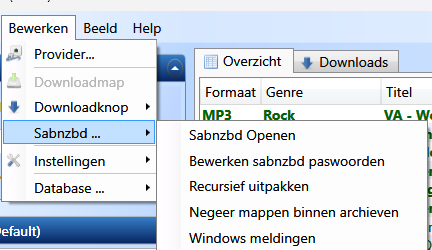
In SpotNet, go to Edit > SABnzbd > Open SABnzbd >
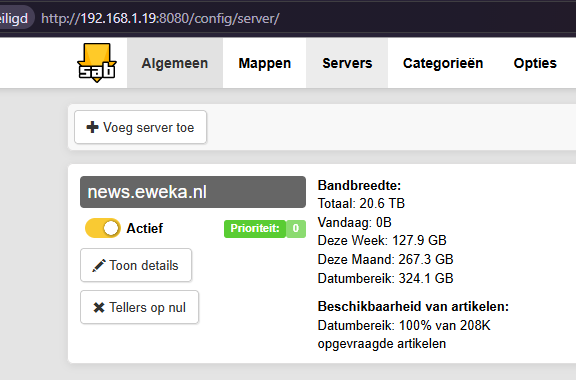
In SpotNet, you can configure this in the same way, as SpotNet actually uses SABnzbd behind the scenes.
Gear icon > Servers
And then click on Add Server.
Setting up a backup provider in NZBget
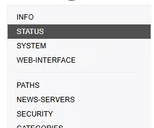
In NZBGet, go to Settings and select Newsservers. It works much the same way as SABnzbd: it uses the server with priority 1 first, followed by the one with priority 2. You should set your backup provider as the second priority.
How much Usenet block credit do you need?
That depends primarily on how it is used. If it serves as your primary account, the data bundle must cover your total download consumption. If it is used as a backup, only the data actually received via that additional server will be counted against your usage.
A hypothetical example: you download 200 GB in a month. Of this, 198 GB is retrieved via your primary provider and 2 GB via your Usenet block account. Your remaining balance will then decrease by approximately 2 GB, according to the provider’s records.
Usage can vary significantly from month to month. Therefore, do not immediately purchase a large data bundle just because the price per gigabyte is lower. Starting with a smaller bundle allows you to first assess whether the provider actually offers any real value.
When is a Usenet block account of no use?
An additional server does not solve every download problem. For instance, it does not help in cases involving a full hard drive, incorrect folder permissions, or a missing archive password.
An incomplete download also remains unusable if the missing items are no longer available anywhere and there is insufficient PAR2 repair data.
Higher retention does not offer any certainty either. Retention indicates how long items can be stored, but it does not guarantee that every upload from that period remains fully available.
Therefore, check the error message first before purchasing additional credit.
What should you look out for when buying a Usenet block account?
In addition to the bundle size, also compare the following points:
- Price per gigabyte: compare bundles in the same way.
- Validity: check whether and when credit expires.
- Underlying network: assess the overlap with your primary provider.
- Retention: check whether this aligns with the age of your downloads.
- Speed and connections: check the package limits.
- SSL/TLS: use an encrypted connection.
- Usage tracking: check whether you can easily monitor your remaining balance.
- Upload access: do not assume that posting is included.
For example, XS News states that its block accounts provide download access, but not upload access. If you wish to post files to Usenet yourself, be sure to explicitly check whether your chosen account allows this.
Frequently asked questions about Usenet block accounts
Do I need a subscription in addition to a block account?
No. You can use a block account independently. However, you will also need a suitable download program and an NZB file—or some other method—to locate the items you wish to download.
Krijg ik met een block account toegang tot een NZB-indexer?
That is not a given. Access to a news server and access to an NZB indexer are different services. Check what your package includes.
Will my credit be used if I don’t download anything?
Normally, download credit is consumed by traffic passing through the server. Please be mindful of automatic downloads and any applicable validity terms.
Will a failed download also be deducted from my balance?
Houd daar rekening mee. Als er al data is binnengehaald voordat een download mislukt, kan die data als verbruik meetellen. Controleer de regels van je provider.
Maakt een block account mijn downloads sneller?
That is not the primary purpose of a backup account. Assigned a lower priority, this server is mainly used for items that your main server does not have. The final speed also depends on your connection, the server, and your computer.
Is a Usenet block account worth it?
A Usenet block account can be a good option if you don’t download very often or if you are looking for an additional news server without needing a second recurring subscription.
When using one as a backup, the most important factor is that the provider adds value to your primary server. Ideally, choose a provider that relies on a different underlying network, configure your server priorities correctly, and monitor your actual usage.
If your downloads are almost always complete, you may not need an extra account. Otherwise, start with a small bundle and evaluate whether it effectively fills in the missing articles.



Be the first to comment